Mastering Depth and Dimension with the 3D Halloween Shadowbox SVG Bundle
Halloween is a holiday defined by atmosphere. It is not merely about costumes or candy; it is about creating an immersive environment that evokes mystery, whimsy, or slight unease. For crafters, designers, and DIY enthusiasts, achieving this depth traditionally requires complex woodworking, expensive materials, or advanced digital modeling skills. However, the landscape of paper crafting has shifted dramatically with the advent of high-precision cutting machines and vector-based design files. Enter the 3D Halloween Shadowbox SVG Bundle, a versatile digital toolkit designed to transform flat sheets of cardstock into multi-dimensional works of art.
This article explores how these digital files work, why they are essential for modern makers, and exactly what you get when you download this comprehensive package. Whether you are a seasoned pro using a Cricut Maker or a beginner dipping your toes into Silhouette Studio, understanding the mechanics behind 3D shadowboxes will elevate your creative output significantly.
What is a 3D Shadowbox SVG?
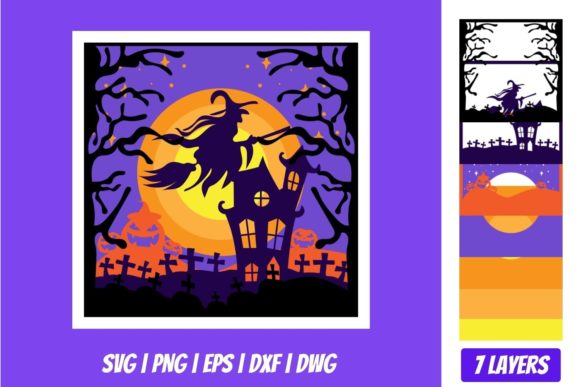
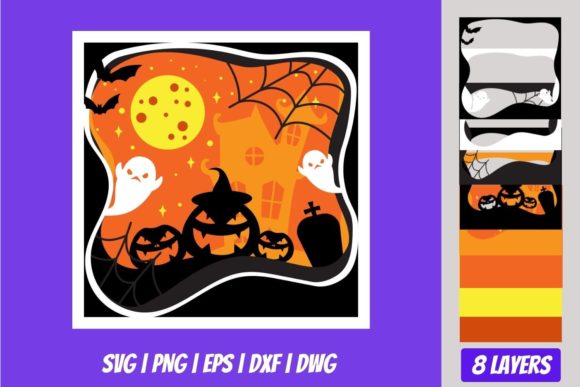
To understand the value of the bundle, one must first understand the format. A standard SVG (Scalable Vector Graphics) file typically contains two-dimensional paths—lines and shapes that tell a cutting machine where to slice. A 3D Shadowbox SVG, however, is a layered masterpiece. Instead of a single image, the file contains multiple distinct layers stacked on top of one another.
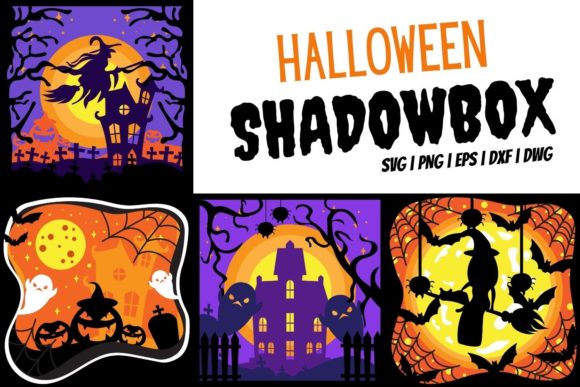
In the context of Halloween, this means you might have a background layer featuring a haunted mansion, a middle layer with gnarled trees, and a foreground layer with a spooky cat or a witch’s hat. When cut from different colors of cardstock and assembled with spacers (often foam tape), these layers create an optical illusion of depth. The result is a piece of art that appears to have physical volume, even though it is made entirely of paper. This technique allows for intricate details that would be impossible to achieve with a single-layer cut, such as overlapping leaves, open windows in a house, or teeth in a monster’s mouth.
Why Versatility Matters: Understanding the File Formats
One of the biggest hurdles in the digital crafting world is compatibility. Not all software speaks the same language. This is precisely why the 3D Halloween Shadowbox SVG Bundle Download is structured to include four distinct file formats within a single zipped folder: SVG, DXF, PNG, and EPS. Each format serves a specific purpose and audience, ensuring that no matter what tools you own, you can utilize these designs.
The SVG Format: The Gold Standard for Modern Cutters
The SVG file is the primary format for most contemporary electronic cutting machines. It is preferred because it retains the individual layers and nodes of the design, allowing you to edit colors, move elements, or resize them without losing quality. If you use Cricut Design Space, Silhouette Designer Edition, Make the Cut MTC, Sure Cuts A Lot (SCAL), or Brother’s Scan and Cut “Canvas” software, the SVG is your go-to file. These programs interpret the SVG data to guide the blade with precision, ensuring that the delicate connections between layers remain intact during the cutting process.
The DXF Format: Bridging the Gap for Basic Software
While SVG is dominant, some users operate on older or more budget-friendly software versions. Specifically, Silhouette Basic Edition often struggles with complex SVGs containing too many grouped elements or proprietary data. This is where the DXF (Drawing Exchange Format) comes in. DXF is an older, widely compatible vector format that strips away unnecessary metadata while preserving the geometric integrity of the cuts. By including a DXF file, the bundle ensures that users who do not have access to premium editing software can still produce professional results.
The EPS Format: For Professional Graphic Designers
For those who prefer industry-standard graphic design tools, the EPS (Encapsulated PostScript) file is included. This format is native to CorelDraw, Inkscape (a free alternative), and Adobe Illustrator. Professionals often use EPS files because they offer precise control over curves and bezier paths, which is crucial when tweaking the spacing of a shadowbox layer before sending it to a cutter. This inclusion makes the bundle valuable not just for hobbyists, but for small business owners creating custom decor.
The PNG Format: Visualization and Reference
Finally, the bundle includes a PNG file with a transparent background at 300 DPI. While you cannot cut a PNG directly with a standard blade cutter, it serves a vital role in planning and visualization. High-resolution PNGs allow you to see exactly how the colors and layers look when combined. You can use this image in photo editing software to mock up how the final shadowbox will look against a wall, or use it as a reference guide to select the perfect shades of orange, purple, and black cardstock.
Practical Applications and Creative Possibilities
Once you have downloaded the 3D Halloween Shadowbox SVG Bundle, the possibilities for application are vast. These files are not limited to simple decorations; they can be integrated into various aspects of home decor, event planning, and even educational projects.
- Home Decor: Create a striking focal point for your entryway or living room. A 3D shadowbox of a full moon rising over a graveyard adds immediate seasonal flair without the clutter of inflatable yard decorations.
- Party Centerpieces: Use smaller scaled versions of the designs as table centerpieces. They are lightweight, easy to transport, and provide a unique conversation starter for guests.
- Educational Tools: Teachers can use these designs to teach geometry and spatial reasoning. By having students assemble the layers, they learn about perspective and depth perception in a hands-on manner.
- Gift Giving: Handmade items hold significant value. A beautifully crafted 3D shadowbox frame makes for a thoughtful, personalized gift for friends and family who appreciate the holidays.
Technical Considerations for Success
While the files themselves are ready to use, success with a 3D shadowbox project relies heavily on execution. Here are a few tips to ensure your 3D Halloween Shadowbox SVG Bundle yields the best results:
- Material Selection: Do not use thin printer paper. To maintain structural integrity, especially for larger pieces, use cardstock ranging from 65lb to 110lb weight. Thicker cardstock holds its shape better and prevents warping.
- Color Contrast: The magic of a shadowbox lies in the separation of layers. Ensure there is sufficient contrast between adjacent layers. For example, if your background is dark blue, avoid using a medium blue for the middle layer; opt for black or white to make the pop-out effect dramatic.
- Assembly Technique: Use double-sided foam tape or specialized shadowbox spacers. Start with the thickest spacers for the back layers and progressively thinner ones for the front, or keep them uniform for a consistent "step" effect. This creates the physical gap that allows light to cast shadows, enhancing the 3D illusion.
- Software Settings: When loading the SVG into Cricut or Silhouette, check the "weld" or "attach" settings carefully. Some layers may need to be welded together if they share common boundaries to prevent the machine from cutting unnecessary internal lines.
Conclusion
The 3D Halloween Shadowbox SVG Bundle represents more than just a collection of digital images; it is a gateway to sophisticated craftsmanship accessible to everyone. By providing a diverse range of formats—including SVG for modern cutters, DXF for basic software, EPS for designers, and PNG for visualization—the bundle removes technical barriers and empowers creators to focus on their artistic vision.
As we continue to integrate technology into our daily creative lives, tools like these demonstrate how digital assets can bridge the gap between screen and reality. Whether you are preparing for October 31st or simply enjoy the art of paper crafting year-round, this bundle offers the flexibility, quality, and depth needed to bring your Halloween imagination to life. Download the files, choose your colors, and start building your three-dimensional world today.